ElasticRAM Split-Pane jvm.options (-Xmx31g OOPs) & opensearch.yml Shard Studio
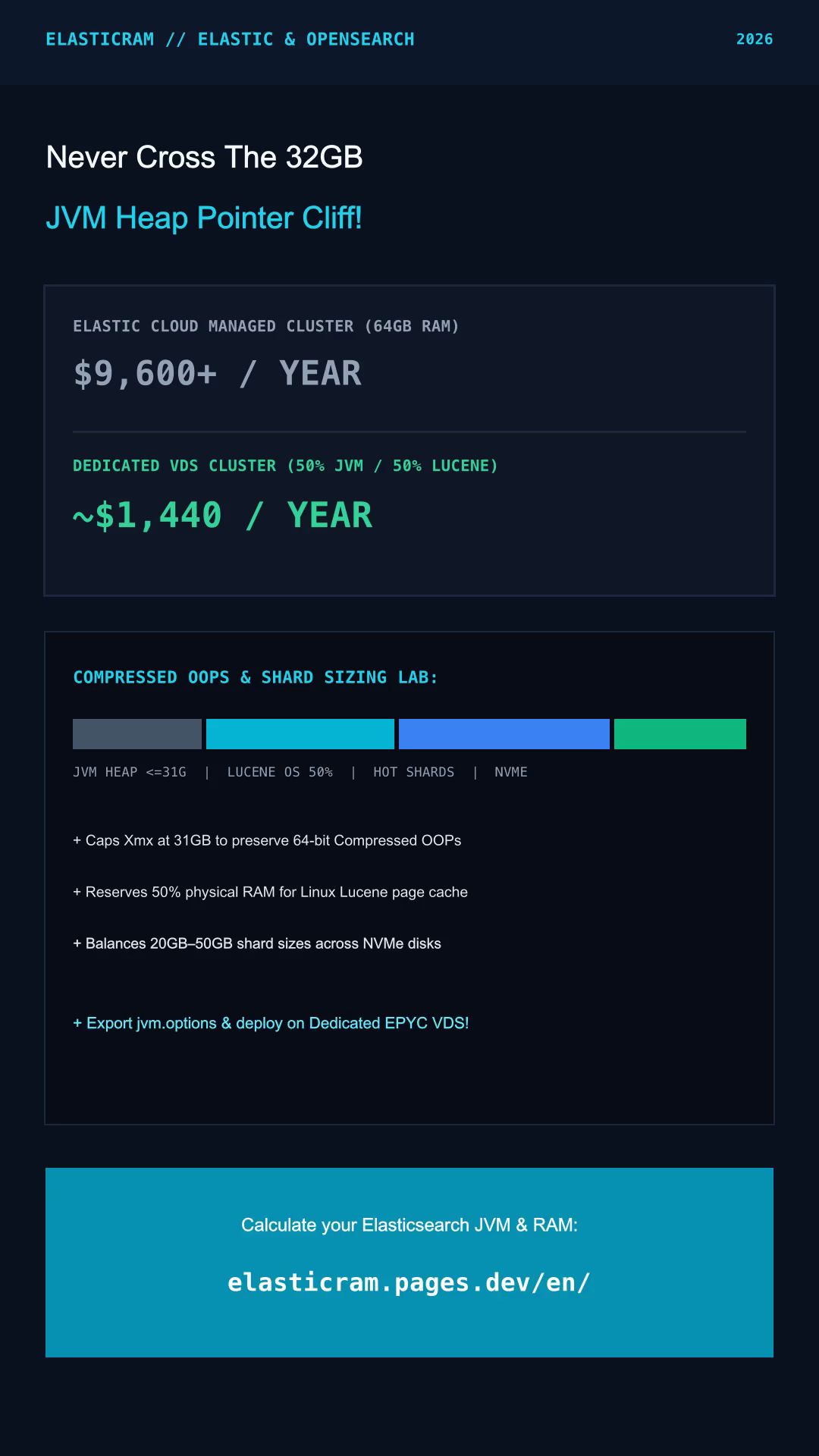
We calculate deterministic Java Virtual Machine heaps under the 31 GB Compressed OOPs pointer barrier (-Xms31g -Xmx31g), reserve 50%+ host RAM for Linux Lucene mmap page caching, size primary shards inside the 20–50 GB window, and provision 15% NVMe headroom below the 85% disk watermark.
- min(31GB, floor(RAM / 2)) Compressed OOPs
- 50%+ Linux Lucene mmap Page Cache
- 20–50 GB/Shard • <=20 Shards/GB Heap
- 1.15x Index × /0.85 Watermark NVMe
## ElasticRAM Studio — /etc/opensearch/jvm.options.d/99-elasticram-heap.options
## Profile: WAZUH-SIEM | Topology: 1x 64GB RAM (12 vCPU) | Hot NVMe: 948GB/node
## 31GB COMPRESSED OOPS GUARD: Never set -Xmx32g..47g (keeps 32-bit object pointers; leaves 33GB for Lucene mmap)
-Xms31g
-Xmx31g
-XX:+UseG1GC
-XX:G1ReservePercent=25
-XX:InitiatingHeapOccupancyPercent=30
-XX:+AlwaysPreTouch
-XX:+ExitOnOutOfMemoryError
-Djava.io.tmpdir=/var/lib/opensearch/tmp- JVM Heap
- Lucene mmap
- Hot NVMe (<85%)
- Shards (20–50G)
- Split-Brain Quorum
- Est. Cloud Delta
-
InterServer Bare-Metal Ryzen 64GB (2TB Enterprise NVMe)
$89.00/moHandles 948GB total hot NVMe retention for Wazuh SIEM and ELK pipelines on 2TB+ bare-metal drives.
Inspect InterServer Bare-Metal Ryzen SIEM Spec via ElasticRAM → -
UltaHost Bare-Metal 128GB (1.92TB RAID-10 NVMe)
$129.00/mo128GB DDR5 ECC supports -Xmx31g with 97GB off-heap Lucene mmap cache (or dual 31g containers) on RAID-10 NVMe.
Review UltaHost 128GB RAID-10 NVMe Server via ElasticRAM →
ElasticRAM Visual Guide: Avoiding the 32GB JVM Compressed OOPs Cliff
We walk through why capping OpenSearch and Elasticsearch heaps at -Xmx31g preserves 4-byte Compressed OOPs while reserving 50%+ host RAM for Linux Lucene mmap page cache.
ElasticRAM Node RAM/NVMe Tier Matrix & Public Vendor Rates (Retrieved 2026-11-12)
We compile published server specifications (DDR5 ECC RAM, physical/vCPU cores, and NVMe storage) from official vendor pricing pages retrieved 2026-11-12 to match each OpenSearch and Wazuh JVM memory tier.
| Infrastructure Vendor | Published Hardware Tier | ElasticRAM Cluster Role Fit | Public Rate & Official Source (2026-11-12) | Verify Spec |
|---|---|---|---|---|
| Hostinger KVM NVMe | 8 GB – 32 GB DDR5 RAM • 2–8 vCPU • 100–400 GB Gen4 NVMe | -Xms4g to -Xms16g single-node OpenSearch, Magento 2 & <25-agent Wazuh | From $5.99 – $19.99/mo promo listhttps://www.hostinger.com/vps-hosting (2026-11-12) |
Check Hostinger KVM NVMe Specs on ElasticRAM → |
| UltaHost Dedicated VDS | 64 GB – 128 GB Dedicated DDR5 ECC • 8–16 Cores • 800 GB–1.92 TB RAID-10 NVMe | Exact 64GB sweet spot: -Xmx31g Compressed OOPs heap + 33GB Lucene mmap cache | $68.00/mo (64GB VDS) • $129.00/mo (128GB)https://ultahost.com/vds-hosting (2026-11-12) |
Inspect UltaHost 64GB -Xmx31g VDS via ElasticRAM → |
| InterServer Bare-Metal Ryzen | 64 GB – 128 GB DDR5 ECC • AMD Ryzen 12–16c • 2,000 GB PCIe Gen4 NVMe | Multi-TB 30–90d Wazuh SIEM & ELK retention below 85% disk watermark | $89.00/mo (64GB Ryzen) • $139.00/mo (128GB)https://www.interserver.net/vps/ (2026-11-12) |
Review InterServer Ryzen 2TB SIEM Host via ElasticRAM → |
| Vultr High Frequency NVMe | 16 GB – 64 GB ECC • 3.8GHz+ High Clock • 384–600 GB Local NVMe + 10G VPC | 3-node split-brain quorum HA clusters & low-latency APAC/EU k-NN search | $96.00 – $240.00/mo public hourly/monthly listhttps://www.vultr.com/pricing/ (2026-11-12) |
Explore Vultr High-Frequency VPC Nodes via ElasticRAM → |
| ChemiCloud LiteSpeed Web | 2 GB – 6 GB Isolated PHP/Web Tier • NVMe Edge + LSCache (Singapore/EU/US) | Decouples Magento/WooCommerce PHP workers so OpenSearch keeps 100% node RAM | From $2.95 – $5.45/mo promotional web tierhttps://chemicloud.com/wordpress-hosting (2026-11-12) |
Offload PHP Web Tier on ChemiCloud via ElasticRAM → |
ElasticRAM Parameter Reference: -Xmx31g OOPs, 50% Lucene Cache & Disk Watermarks
Our ElasticRAM diagrams and parameter table below explain why production OpenSearch 2.x and Elasticsearch 8.x nodes lock -Xmx31g while guarding 85%/90%/95% disk allocation watermarks.
| Parameter (jvm.options / opensearch.yml) | Guardrail | OpenSearch & Apache Lucene Engineering Behavior |
|---|---|---|
-Xms31g / -Xmx31g (jvm.options) |
<= 31 GB (50% RAM) |
Locks initial and max HotSpot heap identically below the ~31.8 GB boundary so 4-byte 32-bit Compressed OOPs stay active and the JVM never pauses to resize memory. |
Linux OS Page Cache (Lucene mmap) |
>= 50% Host RAM |
Apache Lucene maps immutable segment postings, column-oriented doc_values, and HNSW vector graphs directly into kernel filesystem cache outside the Java heap. |
index.number_of_shards (ISM Rollover) |
10–50 GB / shard |
Keep search shards around 10–30 GB and time-series Wazuh/ELK log shards between 30–50 GB via ISM rollover to prevent both tiny-shard heap waste and slow merges. |
cluster.max_shards_per_node |
<= 20 * Heap_GB |
Caps total open primary + replica shards per data node (e.g., 620 max shards on -Xmx31g) so Lucene FST metadata never exhausts Old Gen JVM memory. |
cluster.routing.allocation.disk.watermark.low |
85% NVMe Used |
Once a node reaches 85% disk usage, OpenSearch stops allocating new replica shards to that disk. ElasticRAM divides indexed volume by 0.85 to keep 15% free. |
cluster.routing.allocation.disk.watermark.high |
90% NVMe Used |
At 90% disk occupancy, the cluster actively relocates existing shards away from the constrained node, spiking network and NVMe I/O if all nodes run tight. |
cluster.routing.allocation.disk.watermark.flood_stage |
95% NVMe Used |
Emergency safeguard that flips indices on the affected disk into index.blocks.read_only_allow_delete: true, halting Wazuh SIEM and log writes until space is freed. |
ElasticRAM Cluster Blueprints, Wazuh SIEM Sizing Guides & Public Cost Audits
Explore all 8 deterministic ElasticRAM cluster blueprints, 4 public cloud cost comparisons, and our full mathematical sizing methodology: All Cluster Blueprints · All Public Cost Audits · Sizing Methodology.
8 ElasticRAM OpenSearch 2.x, -Xmx31g Heap & Wazuh SIEM Blueprints
-
JVM-31G-OOPSOpen JVM-31G-OOPS Spec →
ElasticRAM 31 GB JVM Heap Rule: Compressed OOPs & Lucene 50/50 Memory Split Explained
ElasticRAM explains why -Xmx32g in OpenSearch 2.x or Elasticsearch 8 disables 32-bit Compressed OOPs, wastes 5GB+ RAM, and why 64GB nodes (-Xmx31g) excel.
-
WAZUH-4X-SIEMOpen WAZUH-4X-SIEM Spec →
ElasticRAM Wazuh 4.x SIEM Indexer Blueprint: Agents, EPS, Hot NVMe & ISM Retention
Use ElasticRAM deterministic formulas to size Wazuh Indexer (OpenSearch 2.x) -Xmx31g heaps, primary shards, and 85%-watermark NVMe storage for 50 to 5,000+ agents.
-
MAGENTO-SEARCHOpen MAGENTO-SEARCH Spec →
ElasticRAM Magento 2.4.7 & Shopware 6 OpenSearch Sizer: Isolate JVM From PHP-FPM
ElasticRAM calculates exact OpenSearch 2.x JVM heaps and search.max_buckets limits for Magento 2.4.7 and Shopware 6 catalogs to prevent OOM reindex crashes.
-
SHARD-20-50GBOpen SHARD-20-50GB Spec →
ElasticRAM Oversharding Remediation: The 20–50 GB/Shard & 20 Shards/GB Heap Formula
ElasticRAM models the 20–50 GB primary shard rule and <=20 shards/GB JVM heap ceiling to eliminate tiny daily shard bloat in OpenSearch and Elasticsearch.
-
OS2-VS-ES8-LICOpen OS2-VS-ES8-LIC Spec →
ElasticRAM OpenSearch 2.x vs Elasticsearch 8.15+ Audit: Apache 2.0 SSO, RBAC & Alerting
ElasticRAM compares OpenSearch 2.x (Apache 2.0) and Elasticsearch 8.15+ (AGPLv3/ELv2) across free OIDC/SAML SSO, webhook alerting, and -Xmx31g JVM parity.
-
ILM-HOT-WARMOpen ILM-HOT-WARM Spec →
ElasticRAM ILM / ISM Hot-Warm-Cold Tiering: Local PCIe NVMe + S3 Snapshot Lifecycle
ElasticRAM architects 90-day to 365-day log retention using 14-day Hot NVMe nodes, force-merged Warm Ryzen tiers, and S3 snapshots for OpenSearch ISM.
-
GRAYLOG-6-STACKOpen GRAYLOG-6-STACK Spec →
ElasticRAM Graylog 6.x + OpenSearch 2.x Stack Sizer: Disk Journal & Dual-JVM Split
ElasticRAM shows how to budget host RAM across Graylog 6 JVM, MongoDB metadata, disk journal spools, and OpenSearch 2.x without starving Lucene mmap.
-
KNN-MMAP-HNSWOpen KNN-MMAP-HNSW Spec →
ElasticRAM OpenSearch k-NN Vector & Hybrid RAG Sizer: Off-Heap HNSW RAM & Quantization
ElasticRAM calculates off-heap HNSW graph memory and Linux mmap cache alongside -Xmx31g JVM heaps for 1M to 20M vector embeddings in OpenSearch 2.x.
4 ElasticRAM Public Rate Comparisons: Self-Hosted OpenSearch vs Cloud
-
SELF-VS-ELASTICRead SELF-VS-ELASTIC Audit →
ElasticRAM Audit: Self-Hosted OpenSearch 2.x on NVMe VDS vs Elastic Cloud 12-Month Cost
ElasticRAM compares published per-GB RAM pricing, OIDC SSO licensing, and NVMe storage costs between self-hosted OpenSearch 2.x and Elastic Cloud (2026-11-12).
-
ULTA64-VS-AWSOSRead ULTA64-VS-AWSOS Audit →
ElasticRAM Cost & Spec Audit: UltaHost 64GB VDS vs AWS OpenSearch Service (r6g.2xlarge)
ElasticRAM compares published UltaHost 64GB Dedicated VDS ($68/mo) specs against AWS Managed OpenSearch r6g.2xlarge.search + gp3 EBS rates for -Xmx31g heaps.
-
OPENSEARCH-VS-CHRead OPENSEARCH-VS-CH Audit →
ElasticRAM Architecture Comparison: OpenSearch 2.x vs ClickHouse for Log & SIEM Workloads
ElasticRAM evaluates architectural tradeoffs between OpenSearch 2.x (-Xmx31g Lucene inverted indices + Wazuh) and ClickHouse (columnar ZSTD SQL OLAP).
-
RYZEN-VS-SIEMRead RYZEN-VS-SIEM Audit →
ElasticRAM SIEM Cost Audit: InterServer Ryzen Bare-Metal (2TB+ NVMe) vs Per-GB Cloud SIEM
ElasticRAM models 100 GB/day Wazuh SIEM retention on published InterServer 64GB–128GB Ryzen bare-metal plans versus metered per-GB managed cloud SIEM pricing.
ElasticRAM Technical FAQs: -Xmx31g Compressed OOPs, Shards & Wazuh SIEM
Why does ElasticRAM cap OpenSearch & Elasticsearch JVM heaps at -Xmx31g on 64GB and 128GB servers?
In 64-bit OpenJDK HotSpot runtimes, setting -Xmx32g or higher disables 32-bit Compressed Ordinary Object Pointers (OOPs), widening every object reference from 4 bytes to 8 bytes. A 32 GB heap actually holds fewer live objects than -Xmx31g; capping at 31 GB preserves compact pointers and leaves 33 GB–97 GB of RAM for Linux Lucene mmap caching.
How does the ElasticRAM Split-Pane Studio calculate Hot NVMe storage for 85% disk watermarks?
We multiply Daily_Ingest_GB * Retention_Days * (1 + Replicas) by a 1.15x Lucene segment/translog indexing factor, then divide by 0.85 so your provisioned NVMe volume keeps 15% free headroom below cluster.routing.allocation.disk.watermark.low (85%).
Why does ElasticRAM enforce 3 or 5 nodes instead of a 2-node OpenSearch cluster?
Distributed consensus requires a strict majority quorum of floor(N/2) + 1 cluster_manager votes. For N = 2, quorum equals floor(2/2) + 1 = 2 — meaning losing either host halts cluster state elections completely, whereas a 3-node topology (quorum = 2) survives a full single-node outage cleanly.
What happens if my OpenSearch cluster violates the ElasticRAM 20–50 GB primary shard rule?
Splitting small logs into hundreds of tiny daily shards (<1 GB each) wastes gigabytes of Old Gen JVM heap on Lucene segment metadata and slows cluster state updates. Conversely, shards above 60–80 GB prolong background segment merges and slow peer recovery after node reboots.
Can I download production jvm.options and opensearch.yml files directly from ElasticRAM without signing up?
Yes. Both configuration files are generated locally inside your browser using deterministic DOM and Blob APIs with zero account registration and zero server-side telemetry of your cluster parameters.
How often does ElasticRAM verify public VDS, Bare-Metal, and KVM NVMe pricing?
All hosting specifications and reference prices on ElasticRAM cite official public vendor pages retrieved on 2026-11-12. Because introductory promos and multi-year renewal rates change over time, always verify the live checkout total on the provider website.